
JSON Logger - Logger
Operation Name
JSON Logger - Logger
Description
Writes a structured JSON log entry for the current Mule event. Use this operation as a drop-in replacement for the standard Mule Logger to produce consistent log output with application, environment, correlation, and message information.
The operation applies the global JSON Logger configuration for field selection, content parsing, formatting, and data masking. It writes the generated entry to the configured logger category and can forward it to a configured Anypoint MQ, JMS, or AMQP destination.
Inputs
| Parameter | Type | Required | Description |
|---|---|---|---|
message | String | Required | The message to include in the log entry. |
content | TypedValue<InputStream> | Optional | Content to include in the log entry. By default, the current payload is converted using the JSON Logger DataWeave serialization helper. |
tracePoint | String | Optional | Processing stage represented by the entry. Allowed values: START, BEFORE_TRANSFORM, AFTER_TRANSFORM, BEFORE_REQUEST, AFTER_REQUEST, FLOW, END, or EXCEPTION. Defaults to START. |
priority | String | Optional | Logger priority. Allowed values: DEBUG, TRACE, INFO, WARN, or ERROR. Defaults to INFO. |
category | String | Optional | Logger category. If omitted, uses org.mule.extension.jsonlogger.JsonLogger. |
correlationId | String | Optional | Correlation identifier for the entry. Defaults to the Mule correlationId. |
Output
The operation returns no output (void). It writes a structured JSON log entry containing the configured and supplied fields, including the message, trace point, priority, correlation ID, timestamp, elapsed time, application metadata, and optional content.
The current Mule event continues through the flow for subsequent processors. Content fields can be parsed as JSON and masked according to the global JSON Logger configuration.
MuleSoft Flow Example
Here's how to call this operation in a MuleSoft flow:
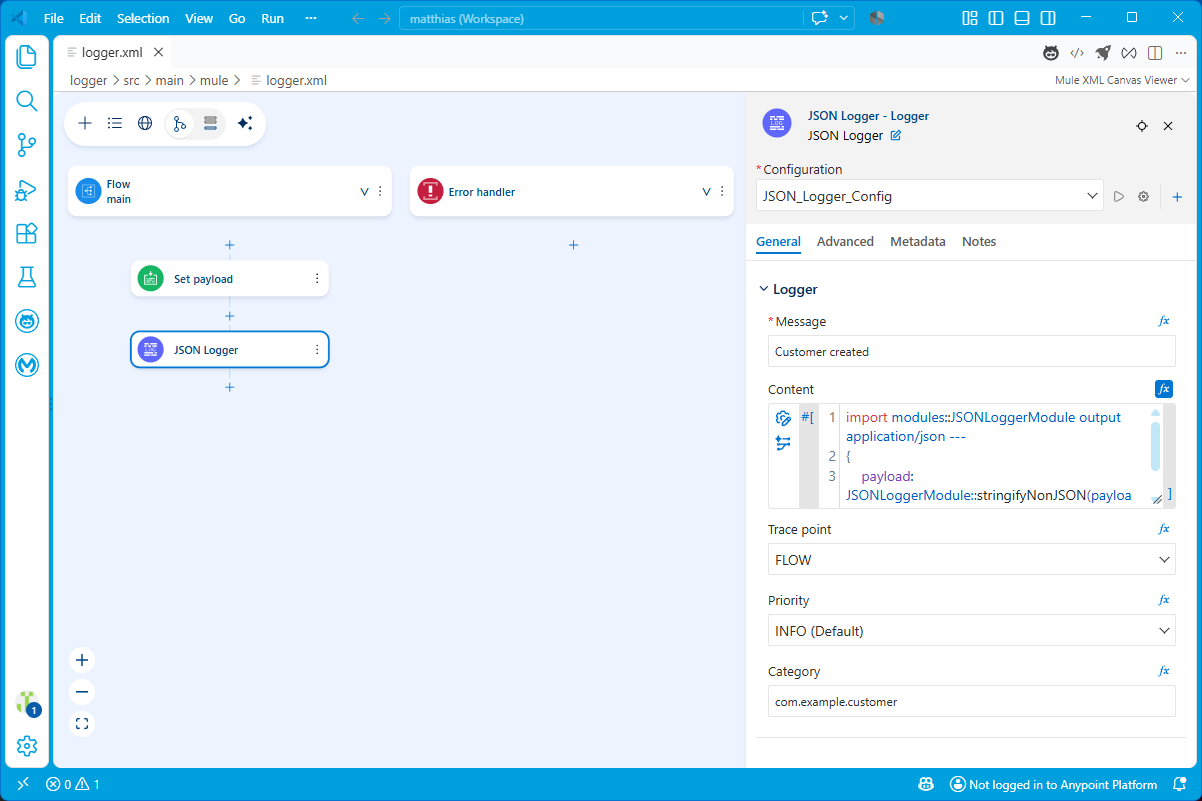
<mule
	xmlns="http://www.mulesoft.org/schema/mule/core"
	xmlns:doc="http://www.mulesoft.org/schema/mule/documentation"
	xmlns:json-logger="http://www.mulesoft.org/schema/mule/json-logger"
	xmlns:xsi="http://www.w3.org/2001/XMLSchema-instance"

	xsi:schemaLocation="http://www.mulesoft.org/schema/mule/core
	http://www.mulesoft.org/schema/mule/core/current/mule.xsd
	http://www.mulesoft.org/schema/mule/json-logger
	http://www.mulesoft.org/schema/mule/json-logger/current/mule-json-logger.xsd">

	<json-logger:config name="JSON_Logger_Config"
		doc:name="JSON Logger Config"
		environment="dev"
		applicationName="example-app"
		applicationVersion="1.0.0"
		disabledFields="content"
		contentFieldsDataMasking="password,client_secret" />

	<flow name="main">
		<set-payload value='#[output application/json --- { customerId: 42, status: "created" }]' />
		<json-logger:logger
			doc:name="JSON Logger"
			config-ref="JSON_Logger_Config"
			message="Customer created"
			tracePoint="FLOW"
			priority="INFO"
			category="com.example.customer" />
	</flow>

</mule>
Notes
- The operation returns
void; the current Mule event continues to the next processor. prioritycontrols the SLF4J log level and defaults toINFO. If that level is disabled, the logger entry is not generated.tracePointdefaults toSTARTand identifies the processing stage represented by the entry.contentis optional. The default expression serializes the current payload, but logging an entire payload on every event can affect performance.- The global
disabledFieldssetting can remove fields such asmessageorcontentfrom the generated JSON. - JSON content can be parsed and masked using
contentFieldsDataMasking, which accepts JSON keys or JSONPath expressions. - When configured, the completed JSON log line is also forwarded to the selected external destination.
Underlying Application Interface
The operation is implemented by the logger method in the JSON Logger Java SDK extension. Its logger parameter group is generated from the loggerProcessor.json schema, while global settings are defined in the loggerConfig.json schema.
Pseudo Code
Operation: logger

Input:
	message: Required String message
	content: Optional TypedValue<InputStream>
	tracePoint: Optional TracePoint, default START
	priority: Optional Priority, default INFO
	category: Optional logger category
	correlationId: Optional Mule correlationId expression
	config: Required JSON Logger global configuration

Output:
	void
	A structured JSON entry is written to the configured logger and, when enabled,
	forwarded to the configured external destination.

Steps:
1. Resolve the configured logger category and current correlation information.
2. Resolve the logger parameter group and apply globally disabled fields.
3. Serialize optional typed content as JSON or text according to its media type.
4. Apply configured content-field masking when JSON content is parsed.
5. Add elapsed time, location information, timestamp, global application settings, and thread name.
6. Serialize the merged object as JSON and write it at the selected priority.
7. Forward the serialized entry to configured external destinations when the logger category is supported.
8. Complete the operation without changing the Mule event.
JSON Logger implementation details
JsonloggerOperations.logger(...): Executes the logger operation and completes with avoidresult.loggerProcessor.json: Defines the operation fields, defaults, summaries, and allowed enum values.loggerConfig.json: Defines global settings, output formatting, disabled fields, and content masking.ObjectMapper: Serializes the merged logger object as JSON.JsonMasker: Masks configured keys and JSONPath expressions in parsed content.LogEventSingleton: Publishes log entries to configured external destinations.